● Obsidian Plugin  ·  v1.0.0  ·  Free & Open Source

Tally counters
for your vault

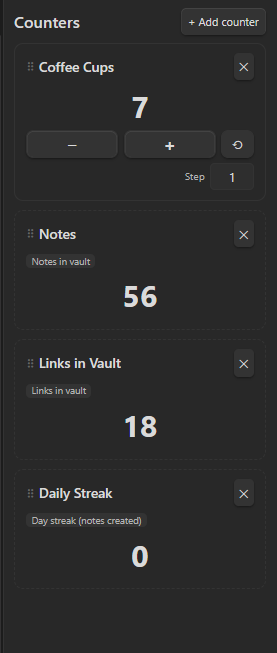
Add as many tap counters as you want in the sidebar — or let them track your vault automatically: notes, links, tags, or your daily streak.

Download latest View on GitHub
Custom Counter — Obsidian
Counter plugin sidebar panel showing a manual Coffee Cups counter and automatic Notes, Links in Vault, and Daily Streak counters

Features

Count anything,
automatically or by hand

Manual tap counters

Classic lap-counter style: big +/− buttons, a reset, and an adjustable step size per counter.

Automatic vault stats

Switch a counter to automatic and it tracks a live number instead: notes, links, tags, or attachments.

Day streak

Count consecutive days you created at least one new note — a built-in nudge to keep showing up in your vault.

Drag to reorder

Grab a counter by its handle and drop it where you want — the order is saved automatically.

As many as you want

No limit on how many counters you keep — mix manual and automatic ones freely in the same panel.

Lightweight

No external dependencies, everything saved through Obsidian's own plugin storage.

Automatic metrics

Pick what a counter should track

Notes in vault Auto
Total number of markdown notes in the vault.
Links in vault Auto
Sum of all resolved links between notes.
Tags used (total) Auto
Total tag occurrences across every note.
Attachments in vault Auto
Non-markdown files: images, PDFs, and more.
Day streak Auto
Consecutive days with at least one new note created.

Installation

Get started in seconds

Manual

  1. Download main.js, manifest.json, styles.css from the latest release
  2. Copy to .obsidian/plugins/custom-counter/ in your vault
  3. Enable Custom Counter in Settings → Community Plugins

Development

Built with TypeScript

# Clone and install
git clone https://github.com/30jannik06/Obsidian-Counter
cd Obsidian-Counter && npm install

# Development
npm run dev # watch mode
npm run build # production build

# Release a new version
npm run version # bumps manifest.json + versions.json
git tag 1.1.0 && git push --tags

Changelog

What's new

1.0.0 2026-10-21 Latest
Added
  • Sidebar panel with unlimited tally counters
  • Manual mode: +/− buttons with adjustable step, reset, rename, delete
  • Automatic mode: live vault stats instead of manual taps
  • Auto metrics: Notes in vault, Links in vault, Tags used, Attachments in vault
  • Auto metric: Day streak of note creation
  • Drag-to-reorder counters via a drag handle
  • Live refresh of automatic counters on vault changes
  • GitHub Actions release workflow